Free for Windows 10 and 11

Your PC,
as a console.

Every game you own on one screen, party chat with your friends and every store's price side by side. All from the sofa, with one controller.

113 MB · Installs in seconds, no administrator prompt · No account needed to play

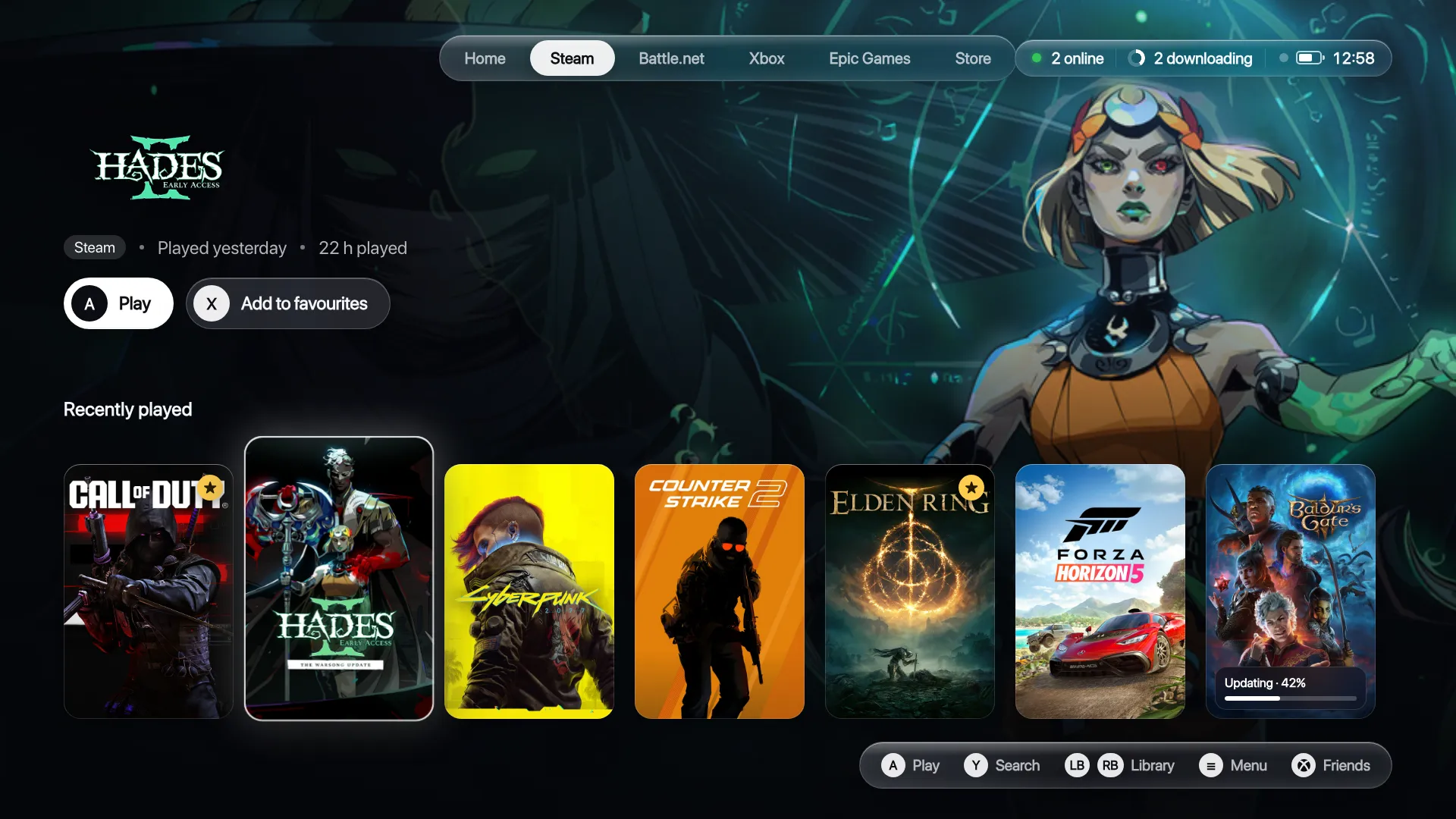
Slouch's Steam shelf on a TV: Hades II in focus with its art filling the screen, and a row of games below
YOUR GAMES FROM
SteamEpic GamesEA appUbisoft ConnectBattle.netXboxGOG
The guide

Press the Xbox button. Over any game.

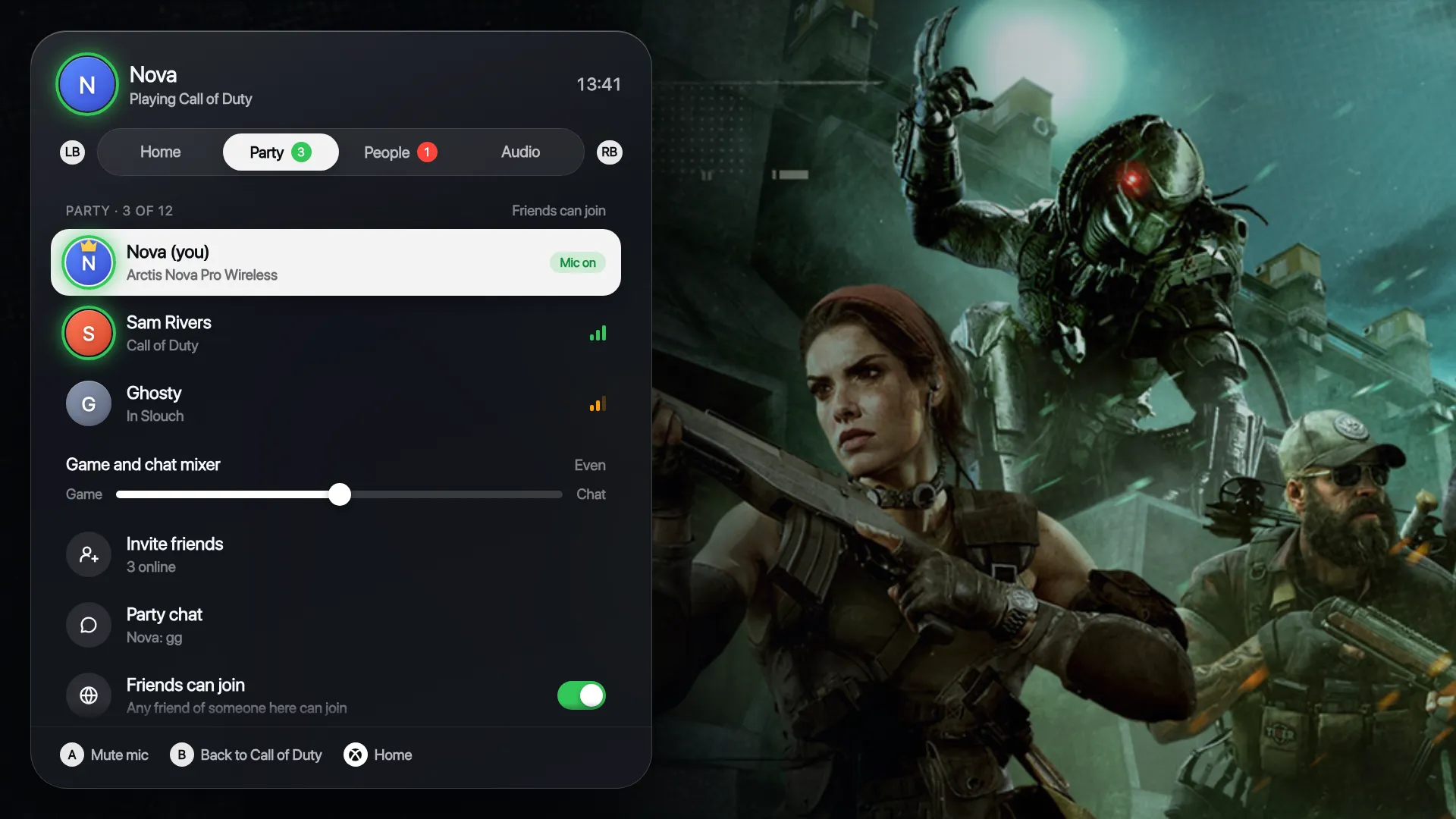
Your party, your friends and your sound, on top of whatever you're playing. Back to the game in one press, home in two.

  • Party chat built in. No Discord window and no alt-tabbing.
  • Background noise removed on your PC before anyone hears it.
  • A game and chat mixer, with volume for each person.
  • Talking rings and small banners, so you always know who's speaking.
The guide open over Call of Duty, showing a party of three, who's talking and the game and chat mixer
The Store

Every price, side by side.

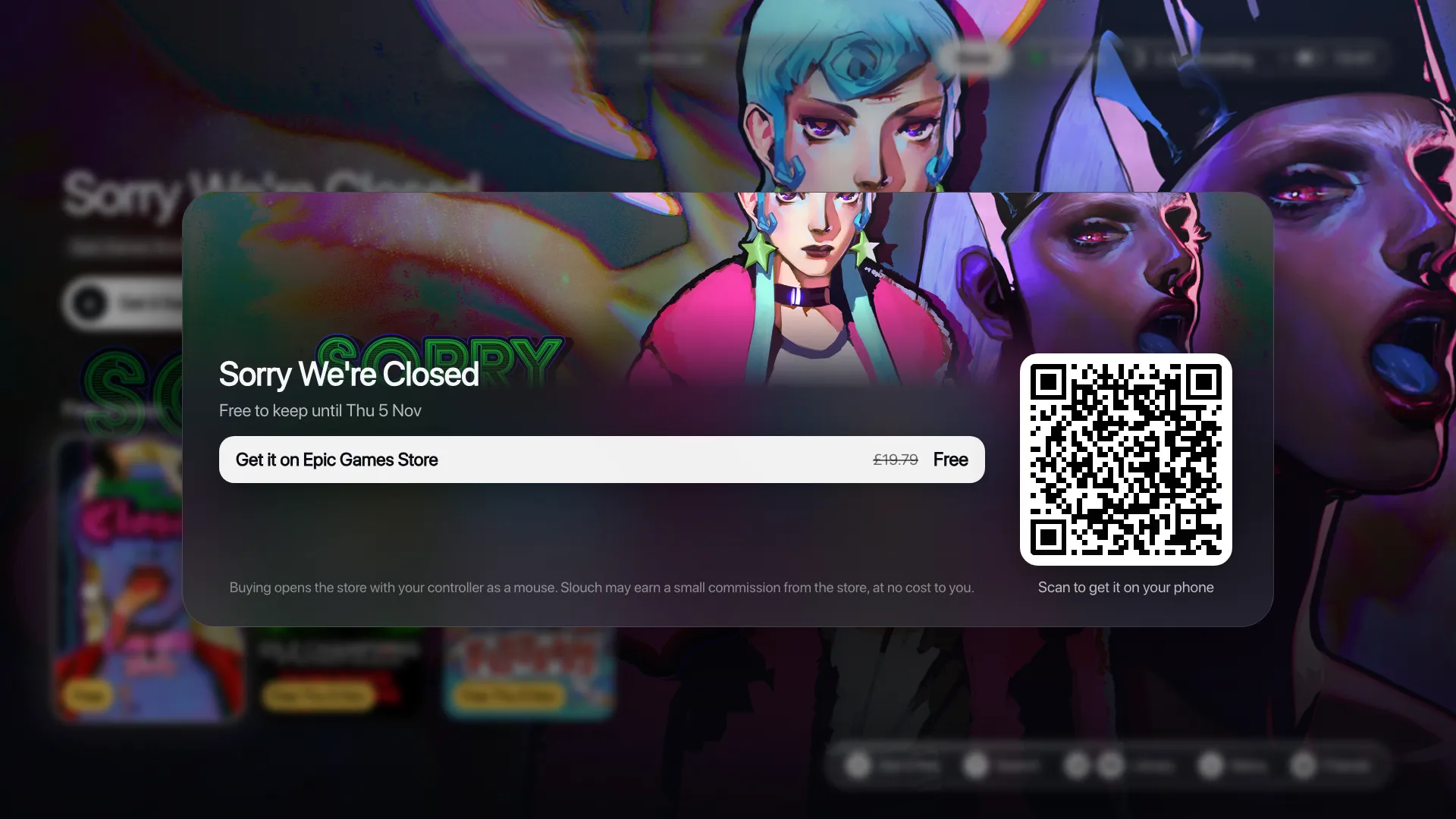
This week's free games to keep, deals on your Steam wishlist and the best sales right now, with each store's price next to the others.

  • Free games to keep, with the date each one ends.
  • Buy on the TV, or scan the code and finish on your phone.
  • You pay the store directly. Slouch never sees your card.
  • Games you already own never show up.
A free game's page in Slouch's Store with its price, the store it's on and a QR code to get it on your phone
Downloads

Updates, handled from the sofa.

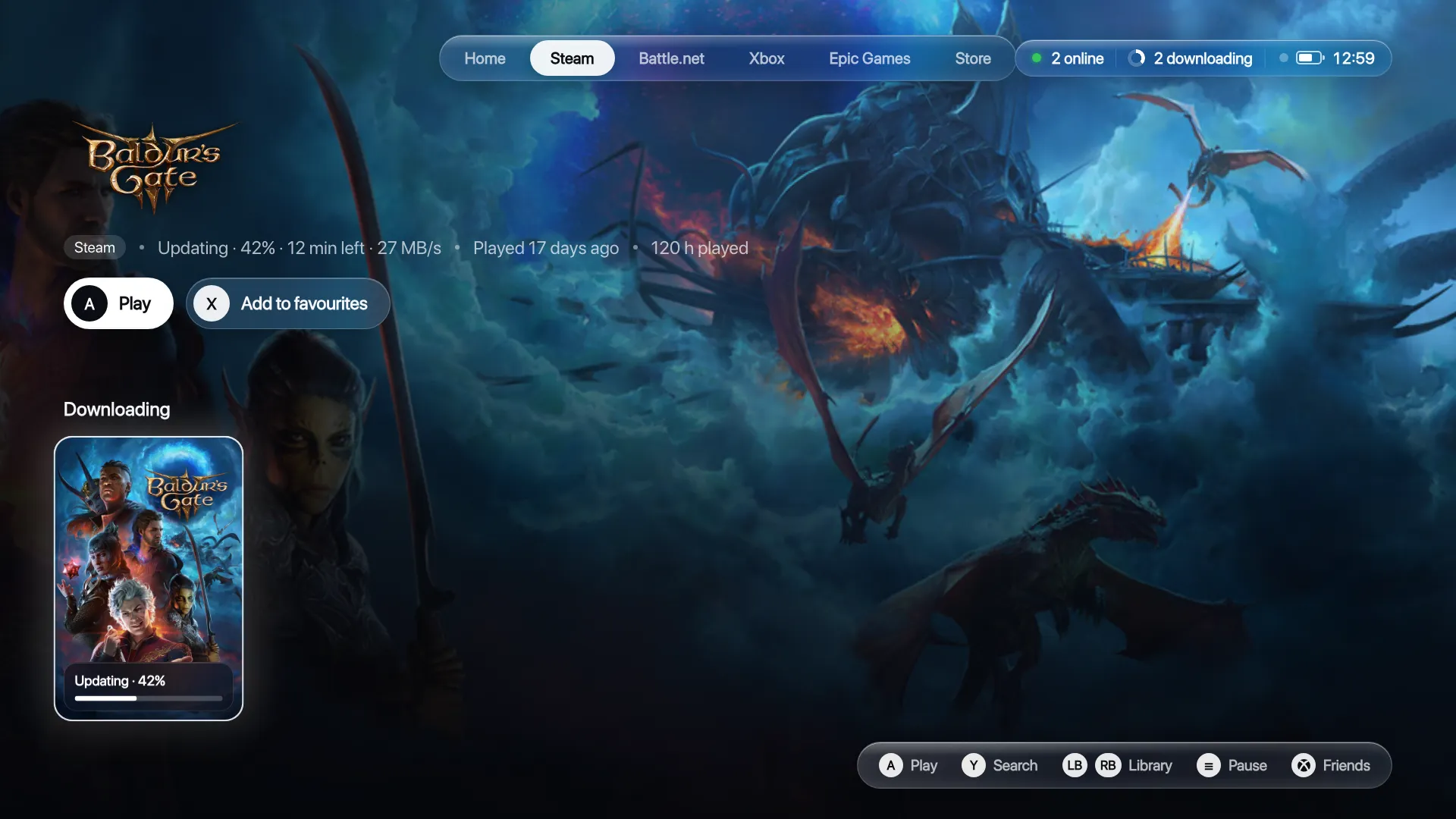
See every download with its time left and speed. Pause, resume or cancel with the controller.

  • Pause, resume or cancel any Steam download.
  • Games keep updating while you're away, so they're ready when you sit down.
  • Slouch updates itself, only when you're not playing. Every update is signed and checked.
Baldur's Gate 3 updating in Slouch, at 42 percent with 12 minutes left at 27 MB a second
Optimise

A console-quiet PC in one go.

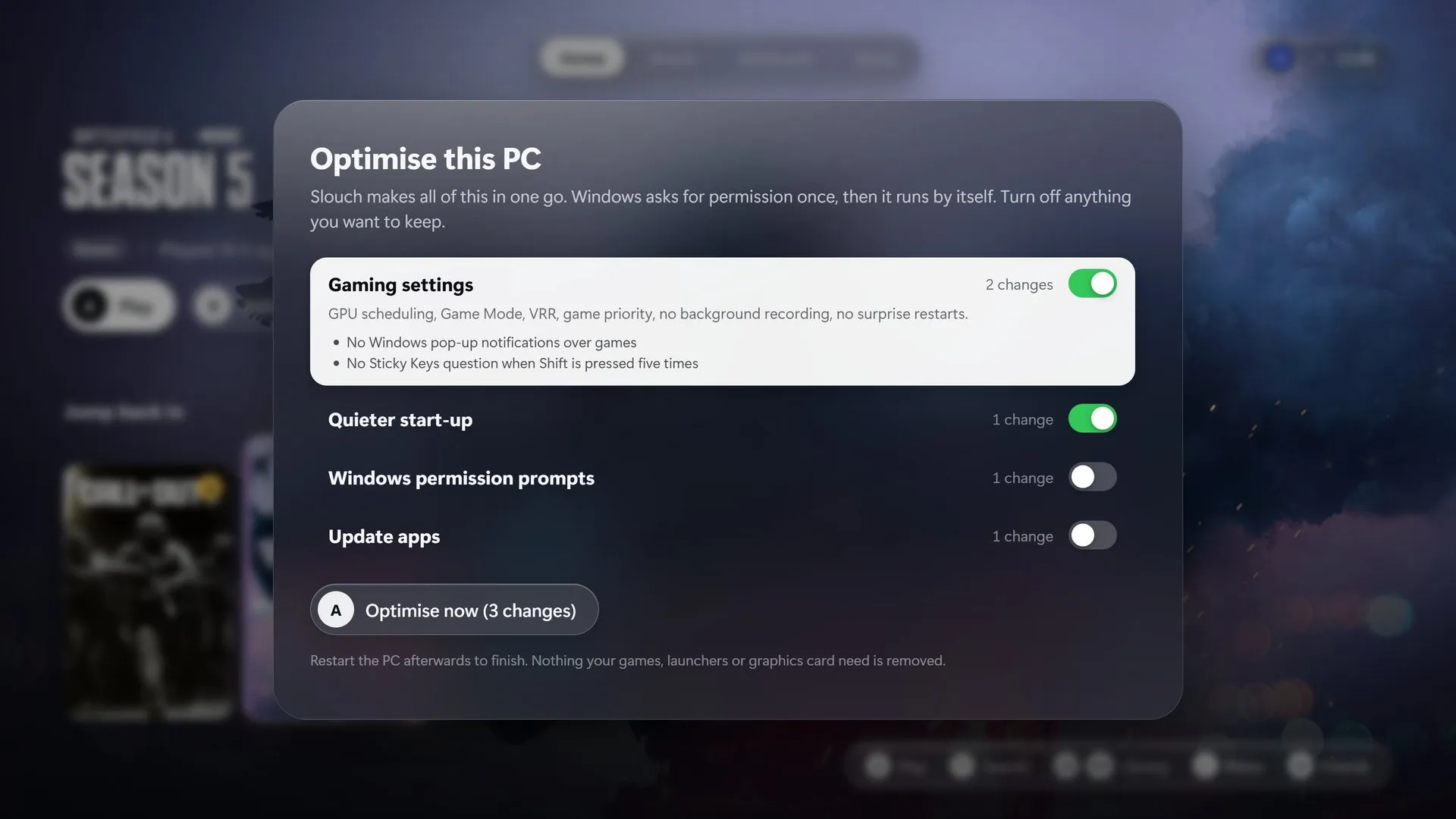
Slouch sets Windows up for games: GPU scheduling, Game Mode, VRR, no pop-ups over your game and no surprise restarts. You see every change and turn off anything you want to keep.

  • One permission prompt, then it runs by itself.
  • Nothing your games, launchers or graphics card need is ever removed.
Slouch's Optimise screen listing gaming settings, a quieter start-up and other changes, each with its own switch

Every game, one shelf

Steam, Epic, EA app, Ubisoft Connect, Battle.net, Xbox and GOG games together, with their proper art and your playtime for each.

Opens with Windows

Turn the PC on and Slouch is there. Console mode skips the desktop entirely.

Sound follows you

Turn a headset on and everything moves to it. Turn it off and it's back on the TV.

A proper keyboard

The same layout as Xbox, numbers included, for search and gamertags.

Power from the sofa

Restart or shut down the PC, or use the controller as a mouse when you need one.

Private by design

No ads, no tracking and no email or password. Delete your account from the guide at any time.

How it compares

Made for the sofa, start to finish.

Steam Big Picture and Playnite are both good. Here's honestly where Slouch is different.

SlouchSteam Big PicturePlaynite
Games from every launcher, found by itselfSteam, Epic, EA app, Ubisoft, Battle.net, Xbox and GOGSteam only; others added by handYes, through add-ons
Built for the TV and a controllerThe whole appYesA separate fullscreen view
The Xbox button over any gameAny game, any storeSteam’s overlay, in Steam gamesNo
Party voice chatBuilt in, with noise removalSteam friends onlyNo
Every store’s price side by sideYes, plus free games to keepSteam store onlyNo
Pause and resume downloadsYesYesNo
Makes Windows feel like a consoleOptimise, in one goNoNo
Emulators and community add-onsNot our focusNoYes
PriceFreeFreeFree

Checked on 4 November 2026 against Valve's and Playnite's own pages.

Screens

See it on the TV.

Every picture here is Slouch itself, not a mock-up.

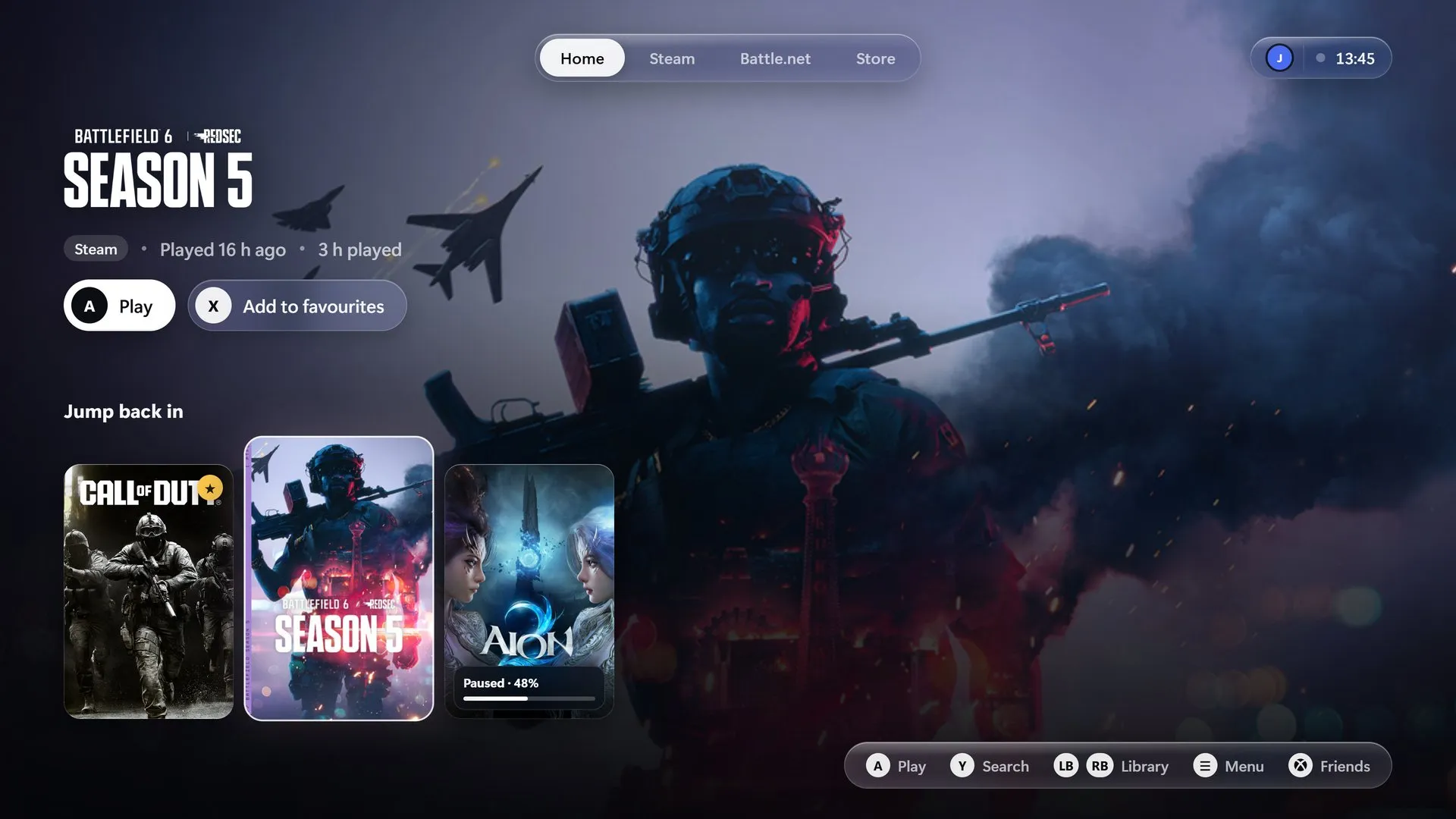
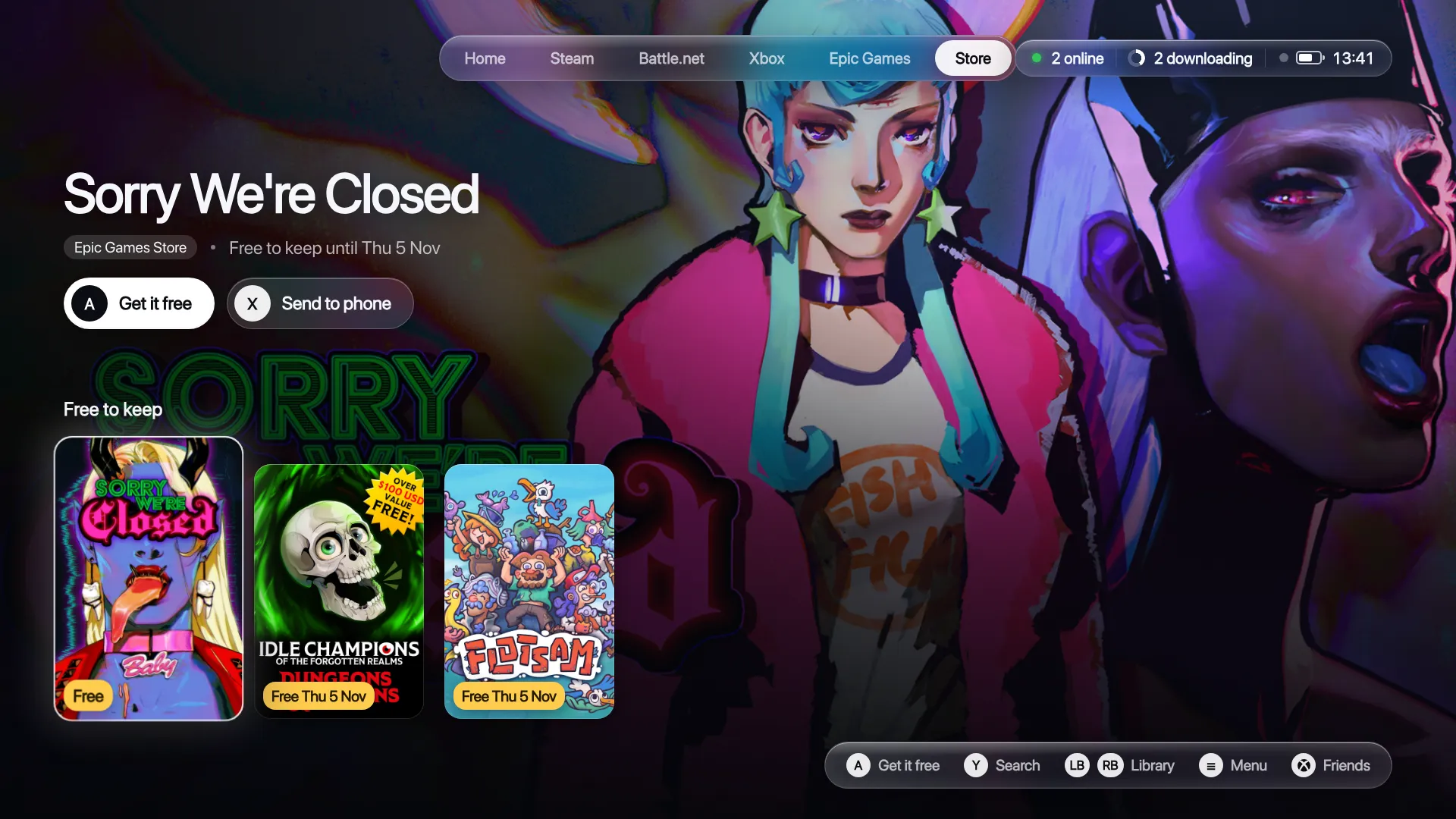
Slouch's Home screen with Battlefield 6 in focus and the games you played last
Home picks up where you left off, and the art changes with every game you land on.
Slouch's Steam shelf with Hades II in focus
A tab for each launcher. LB and RB move between them.
Slouch's Store showing this week's free games to keep
This week's free games, the day they end and a button to get them.
The guide's Party tab over a game
The guide over a game: who's in your party, who's talking and the mixer.
A game updating in Slouch with time left and speed
Time left and speed for every download. The Menu button pauses it.
Slouch's Optimise screen
Every change listed, each with its own switch.
Free and Plus

Free. Properly free.

Everything on this page is free, with no ads, no trial and no time limit. Slouch Plus will add the extras that cost us money to run.

Slouch

£0
Free for good
  • Every game in one place, from every launcher
  • The guide over any game, with party chat and friends
  • The Store: free games, wishlist deals and every price
  • Downloads you can pause, resume and cancel
  • Optimise, for a console-quiet Windows
  • Updates that install themselves
Download free
Coming soon

Slouch Plus

£2.99a month
or £24.99 once, yours for good
  • Game tuning for your TV. The right resolution, HDR, frame cap and upscaling for each game, set when you press play.
  • Proof it worked. Frame rates before and after, on screen.
  • No stutter after updates. Slouch warms up a game's shaders before you play.
  • Party voice that always connects, through our relay when PCs can't reach each other.
  • Your phone as a remote and keyboard.
  • Themes, animated backgrounds and sounds.
Coming soon

Nothing that's free today will move to Plus.

Questions

Straight answers.

Is it really free?

Yes. No ads, no trial and nothing taken away later. Slouch Plus is optional, and everything free today stays free.

How does Slouch make money?

When you buy a game through the Store, the store may pay Slouch a small commission. Your price is exactly the same. Later, Slouch Plus will pay for the extras.

Is it better than Steam Big Picture?

For anyone with games in more than one store, yes. Big Picture shows Steam games; Slouch shows Steam, Epic, EA, Ubisoft, Battle.net, Xbox and GOG together, with party chat and the guide over every one of them.

Does it replace Steam?

No. Slouch sits on top of the launchers you already have. Your games, saves and purchases stay where they are.

What does it collect?

Nothing about how you use your PC. Friends and parties need a gamertag, and friends see the game you're playing. The privacy page lists everything.

Which controllers work?

Xbox controllers, wired or wireless, everywhere, including the guide over your games. PlayStation controllers work across Slouch's own screens; the guide over a game needs an Xbox controller for now.

Is it safe to use with online games?

Yes. Slouch never touches a game's files or memory. It launches games through their own launchers, the same way you would.

Windows says it doesn't recognise Slouch

Slouch is new, so Windows may warn before it installs. Choose More info, then Run anyway. Slouch installs for you alone, with no administrator prompt.

Can I still use a mouse and keyboard?

Yes. Touch the mouse or keyboard and Slouch steps aside for the Windows desktop. The Xbox button brings it straight back.

How do I remove it?

Uninstall it from Windows' installed apps like anything else. Everything Slouch added goes with it.
Put the mouse away.

Install Slouch, pick up your controller and play.

Download for Windows

Free · Windows 10 and 11 · 113 MB